
Google Ads for B2B: how to optimize campaigns for lead quality

Author: Traffic Trends
· 13min read

A B2B Google Ads campaign can bring in more and more form submissions at a falling cost per conversion, and the sales team still sees no improvement. Some contacts never reply, some don’t match the customer profile, and only a small share make it to a sales conversation. In B2B this happens more often than you might think, and the problem is not always the ads, the bids or the budget. Sometimes the campaign is doing exactly what it was told to do, except the ad system has no way of knowing on its own which of the people willing to fill in a form will turn into a valuable customer. That is why effective Google Ads in B2B starts not with a bigger budget, but with a question: what data are we giving the system, and what are we teaching the algorithm with it?
A form is only the beginning
In e‑commerce, the path from an ad to revenue is fairly easy to measure. A user clicks an ad, goes to the store, places an order, and the system can attribute a specific sales value to the campaign.
In B2B sales and services the process is different. A typical path might look like this:
ad click → website visit → form → lead qualification → sales call → proposal → negotiation → signed contract
Weeks or months can pass between the first contact and the sale. What’s more, the later stages bring information that Google Ads cannot learn about unless ad data is connected to the CRM.
To the ad platform, two forms can look identical. To a sales rep, the difference can be huge: the first comes from a 300-person company looking for a supplier with a set budget, the second from a private individual asking about a service the company doesn’t even offer.
If both events have exactly the same value in Google Ads, the system is told that both were equally desirable. And that is where the biggest problem with optimizing B2B campaigns begins.
Before you improve the campaign, sort out your conversions
In many Google Ads accounts the problem is not a lack of data, but too many events treated as equal goals.
A click on a phone number, a catalog download, a form submission and a booked consultation can all be useful signals about user behaviour. That doesn’t mean they should all have the same influence on automated bidding.
Google Ads now lets you distinguish between primary and secondary conversions. Primary conversions can be used for bid optimization, while secondary ones are mainly for observation and reporting, unless they are used in a specific custom goal setup. In practice, this lets you build a hierarchy of events.
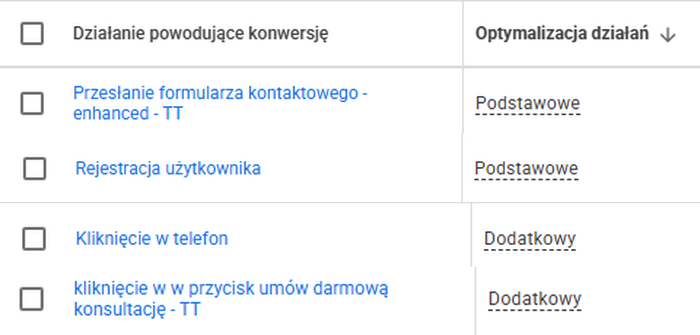
Conversion events split into primary goals (form, sign-up) and secondary goals (phone click, consultation button click).
So when you run campaigns, make sure your Google Ads service covers not only bid and budget optimization, but also setting the right goals and the way conversions are measured.
Supporting events
You can measure, among other things:
- a catalog or report download,
- a click on an email address,
- a click on a phone number,
- a visit to the contact page,
- a view of a key offer page,
- starting to fill in a form.
This data helps you analyse user behaviour, but it shouldn’t always directly decide who the system shows the next ad to.
Business events
Actions closer to the sale matter much more:
- submitting a complete form,
- booking a meeting,
- sending a request for a quote,
- the sales team qualifying the lead,
- creating a sales opportunity,
- signing a contract.
The further along the sales process an event sent to Google Ads is, the better it reflects the real value of the user you acquired.
Of course, this doesn’t mean every company should immediately optimize campaigns only for signed contracts. With a small number of conversions, there may simply not be enough data. The idea is to gradually move the optimization point from “who sent a form?” towards “who turned out to be a valuable sales opportunity?“.
30 leads at €50 each are not necessarily better than 15 leads at €75
Cost per lead is one of the basic metrics of a B2B campaign. On its own, though, it says little about profitability.
Let’s take two hypothetical traffic sources.
| Campaign | Number of leads | Cost per lead | Leads qualified by sales |
|---|---|---|---|
| Campaign A | 30 | €50 | 3 |
| Campaign B | 15 | €75 | 8 |
If you look only at the number of forms and CPL, campaign A wins. If you look at the quality of the contacts, the picture changes completely.
The cost of acquiring one qualified lead is:
- in campaign A: €500,
- in campaign B: €140.63.
That is why the decision to raise or cut the budget shouldn’t be based only on the cost of a form.
In B2B, metrics like these become much more important:
- cost per qualified lead,
- the share of leads accepted by sales,
- cost per sales opportunity,
- the pipeline value generated by the campaign,
- the number of customers,
- revenue and margin attributed to the source.
Not all of this data has to live in Google Ads. But it should be part of how you judge campaign performance.
Give conversions a value instead of treating them all the same
The next step is assigning value to conversions.
Let’s say a company knows from historical data that about 20% of qualified leads end in a sale, and the average value of a new customer is €5,000.
The simplified expected value of such a lead is:
20% × €5,000 = €1,000
That doesn’t mean the company earns €1,000 on every lead. It is a statistical value that helps you compare different types of events.
You can take a similar approach to earlier stages of the funnel. If a regular form is much less likely to end in a sale than a lead already checked by a sales rep, their values in the system shouldn’t be the same.
Later on, this approach can let you use value-based bidding strategies, instead of focusing the campaign only on maximizing the number of conversions.
The most important thing, though, is where the values come from. There’s no point entering €2.50, €25 and €125 just because “there has to be some hierarchy”. It’s better to use CRM data and even a simplified model based on the real conversion rate between sales stages.
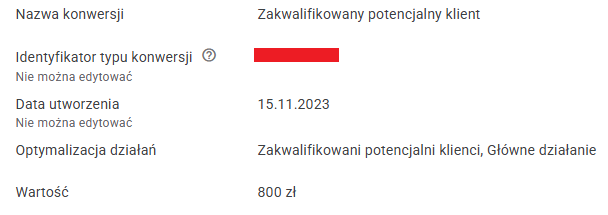
The “Qualified lead” conversion with an assigned value of PLN 800 (€200).
Your CRM should send feedback to Google Ads
In the standard setup, the flow of information often ends when the form is submitted. Google Ads acquires the user and passes their details to the company, and from then on the CRM tracks what happens next. The problem is that what the sales team learns later never goes back to the ad system, and that is exactly where the information about whether the campaign actually reached the right person lives.
If a lead is marked in the CRM as:
- qualified,
- unqualified,
- a sales opportunity,
- a customer,
that information can be used to assess the traffic source much more accurately.
One way to connect the advertising and sales worlds is with click identifiers such as the GCLID. They let you link an ad click to a later offline event. In practice, the company can store the identifier with the lead’s details and then tell Google Ads that a specific contact has reached a given stage of the process.
The current enhanced conversions for leads feature also uses first-party data provided by the user, such as an email address or phone number, sent in hashed form. This data helps match later offline conversions to the earlier ad interaction more accurately. Google also recommends sending the GCLID when it is available.
As a result, instead of:
campaign → 40 forms
you can analyse:
campaign → 40 forms → 15 valid leads → 7 sales opportunities → 3 customers
That is a completely different quality of information.
Want to start measuring the real quality of your leads?
We will review your analytics and account structure and show you how to stop wasting budget on empty form submissions.
Get a free B2B Google Ads strategy consultation from Traffic Trends
Automation won’t fix the wrong goal
Automated bidding strategies can be very good at achieving the goal you give them. That is both their biggest strength and a potential problem. If the valuable signal is a qualified lead, automation can look for users similar to people who generated such contacts before. If the most important signal becomes an easy action with little business value, the system may start generating exactly that.
So before you change your bidding strategy, ask three questions:
- Which conversions are currently used for optimization?
- Do they really mean business success?
- Does Google Ads receive information about lead quality after the leads are submitted?
Only then is it worth discussing target CPA, ROAS or maximizing conversion value.
Search or Performance Max? Data first, campaign type second
In B2B the question often comes up whether to go with classic search campaigns or Performance Max. There is no single right answer for every account.
Search lets you work very deliberately with user queries and is especially useful where business intent can be recognized from the search phrase.
For example, a user typing “WMS system for a logistics centre” sends a much stronger business signal than someone searching for a general “warehouse software”. That is why, in specialist B2B, precise long-tail phrases can be valuable even if their search volume is small.
Performance Max works differently. The campaign uses a wider range of Google assets and ad placements, along with automation, to look for conversions. At the same time, advertisers now have more ways to steer traffic than in the early days of this campaign type. Options include search themes, negative keywords and brand exclusions.
This matters especially in B2B, where one type of irrelevant traffic can generate a lot of misleading conversions.
So don’t adopt the rule “Search = good leads, Performance Max = poor leads”. A better question is: which campaign type, in our case, generates valuable sales opportunities when we judge the results using CRM data?
A well-configured Performance Max campaign can be a valuable part of your strategy. A badly configured Search campaign can burn through the budget just as effectively.
Negative keywords still matter
A narrow audience means random traffic is particularly expensive.
A company that sells only to businesses may get visits from:
- students,
- job seekers,
- individual consumers,
- users looking for free materials,
- people looking for instructions,
- people interested in a completely different meaning of the same phrase.
That is why reviewing search terms and expanding negative keyword lists should be a regular part of managing a campaign.
Typical negatives such as “job”, “free” or “pdf” can be a good starting point in some industries, but they shouldn’t be copied automatically into every account. For example, a manufacturer of specialist technical documentation may win valuable contacts precisely through PDF files, because context matters. In Performance Max, negative keywords can now work at campaign level and are used to limit specific queries in Search and Shopping inventory. Google also offers brand exclusions, which help separate certain branded traffic.
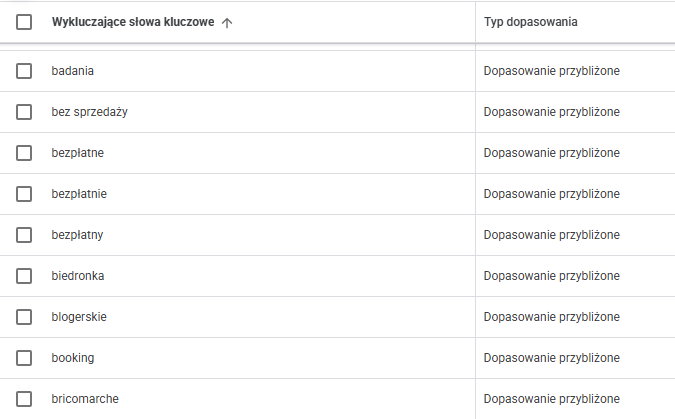
Part of a negative keyword list with broad match.
First-party data is especially important in B2B
A company that has been operating for a few years may have something far more valuable than a general list of interests: information about its real customers.
First-party data can help the system better understand who buys the company’s products or services.
Customer Match lets you use your own customer data in advertising, and Google also points to such data as one way of giving Performance Max information about valuable audiences.
That doesn’t mean uploading your entire contact database. It can be much more useful to create separate groups based on customer quality, for example:
- current strategic customers,
- companies with the highest contract value,
- customers using a specific service category,
- customers with a high lifetime value,
- lost sales opportunities with a good profile.
The better organized the input data, the more valuable it is for the campaign.
Don’t try to fix the ad if the problem is the landing page
Poor lead quality doesn’t always come from targeting. Sometimes the ad reaches the right group, but the page leaves too much room for interpretation.
A B2B landing page should quickly answer questions such as:
- what type of company the service is for,
- what problem it solves,
- who the offer is not for,
- what the scope of work is,
- what happens after you send an enquiry.
In some cases it makes sense to raise the bar on purpose. A short form with just an “email” field will probably generate more contacts. A form that asks about company size, project type or scope of needs may reduce the number of submissions, but make them easier to qualify. And that can be a better result, even if the cost of a single form goes up.
After all, the goal in B2B is not the cheapest form. The goal is acquiring customers profitably.
Segment campaigns when there is a business decision behind the split
Separate campaigns shouldn’t be created just to make the account look more detailed.
Segmentation makes sense when individual groups need a different:
- budget,
- message,
- goal,
- landing page,
- territory,
- product type,
- way of measuring value.
So you might, for example, separate a lead generation campaign for one product line from a campaign promoting an offer with a completely different contract value.
Similarly, it is worth separating a market where the average customer value is several times higher, if that lets you apply a different budget strategy.
The point isn’t splitting campaigns for its own sake. The point is being able to make better decisions as a result.
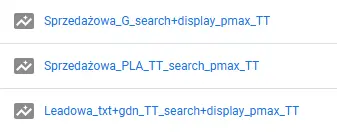
Performance Max campaign names split by goal: sales and leads.
Location, demographics and ad schedule: analyse, don’t guess
In B2B campaigns it is easy to fall into the trap of simple rules.
- “We don’t advertise in the evening, because businesses aren’t working then.”
- “We switch off weekends.”
- “We exclude a certain age group.”
- “We put most of the budget into the biggest cities.”
Each of these decisions may be right. Each may also be a mistake.
The person responsible for buying an industrial machine may do their research in the evening. A business owner may look for a supplier on a Saturday. A high-quality lead may come from a smaller town, because a company’s head office doesn’t have to be in Warsaw, Poznań or Wrocław.
That is why exclusions should be based on data. If weekend traffic generates lots of contacts for six months but none of them pass qualification, you have an argument for cutting the budget. But if forms sent in the evening convert into customers just as well as those sent during working hours, switching off ads may only reduce your reach.
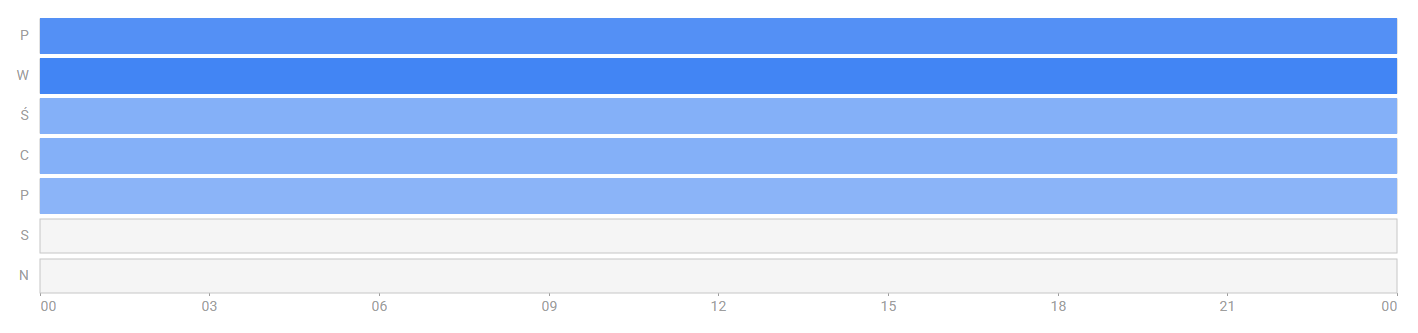
Ad schedule with ads switched off on Saturdays and Sundays.
Five signs that Google Ads is optimizing for the wrong outcome
You don’t always need a complex audit to spot a problem with how lead quality is measured. Take a closer look at your campaign when:
1. Conversions are going up, but sales don’t feel it
This is the most obvious sign. If Google Ads reports steady improvement while the number of valuable sales conversations stays flat, check how conversions are defined.
2. Cost per form is falling, but more and more leads are rejected
The algorithm is probably finding cheaper and cheaper ways to hit the goal you set. The problem is that a cheap form doesn’t have to mean a good customer.
3. The best campaign according to Google Ads is the worst according to sales
Don’t treat this gap as a difference of opinion. Most often it means there is no data connecting marketing and sales.
4. Nobody knows which campaigns generated customers
If the organization can give you the CPL for every campaign but can’t say which ones brought in sales, the analysis stops far too early.
5. A bigger budget brings more leads, but not more pipeline value
Scaling a campaign only makes sense when the business value of the opportunities grows along with the spend. If only the number of forms goes up, fix the measurement first.
What should you check before increasing the budget?
Before a company decides to put more money into B2B Google Ads, it’s worth answering a few specific questions.
Do we know which events drive automated bidding? If not, start with your conversion setup.
Can we tell a lead from a valuable lead? If not, you need a qualification process.
Can CRM data be linked to the acquisition source? If not, sort out click identification and offline conversion imports.
Do we know which campaigns generate sales opportunities, not just forms? If not, comparing campaigns by CPL can lead to wrong decisions.
Does the page filter visitors on its own? If the offer is unclear and anyone can send a form, changing ad settings alone won’t solve the problem.
Are exclusions based on data? Schedules, locations, keywords and audiences should be limited based on results, not gut feeling.
In B2B the winner is not the campaign with the most leads, but the one that brings in business
Google Ads can take a user to a form, but in B2B that is usually where the sales process only begins. That is why the number of conversions alone isn’t enough to judge results.
The better a company can connect ad data with information from its CRM, the more accurately it can see which campaigns really generate valuable customers. Correctly configured goals, conversion values, data from later sales stages, sensible segmentation and deliberate use of automation let you shift the focus from quantity to quality.
And that is when Google Ads stops being a system for generating forms and becomes a tool that helps you win real business.
Want to check whether your Google Ads campaigns are optimized for leads that have real sales value?
We will review your campaign structure, how you measure conversions and the data the algorithms use, and then point out where your budget could work harder.
Get a free B2B Google Ads strategy consultation from Traffic Trends
Our services
Full-spectrum B2B e‑commerce support
B2B sales platforms on Magento, Shopware, Sylius and Endora Commerce: per-customer price lists, RFQ, a customer portal and ERP integration.
Implementation of ERP and PIM SystemsERP and PIM implementation and integration (Pimcore, Akeneo, Ergonode) for online sales: one source of product data, prices and stock for your store and marketplaces.
E‑commerce Consulting and AnalysisB2B e‑commerce consulting: online sales strategy, platform selection, implementation roadmap and data analytics (GA4, Power BI, Looker Studio). Decisions based on data, not gut feeling.
Keep reading
Recently published

How much does a B2B platform cost? What goes into implementation and running costs
The licence is only the start. What a B2B platform really costs: implementation, integrations, migration and maintenance. How to compare quotes and work out TCO.
Read more
Self-hosting, a guided rollout or Cloud: how to choose your way into Endora Commerce
One codebase, three ways in: when self-hosting Endora Commerce pays off for a B2B company, when a rollout with Endora's team does, and when Cloud fits.
Read more
Endora Commerce under the MIT licence: what open code changes when you choose a B2B platform
Endora Commerce is now open source under MIT. What it means for a B2B company: code ownership, paid modules, and self-hosting vs a rollout vs Cloud.
Read more
Why I Started the Manufaktura E‑commerce Podcast
Michał Zabielski on how the Manufaktura E‑commerce podcast started, who it's for, and what episodes you'll find. 22 episodes about building B2B platforms.
Read more
A B2B Sales Platform for Manufacturing: ERP, PIM and Online Sales in One Place
A B2B sales platform for manufacturing brings ERP, PIM and online sales into one process. See how industrial companies can sell online without data chaos.
Read more
Endora Commerce features: which modules a rollout starts with
How we match Endora Commerce modules to a B2B company’s processes: pricing, orders, warehouses and channels. The full catalog is on the product site.
Read more
Endora Commerce industries: how we match a rollout to your business
How we tailor an Endora Commerce rollout to the industry: manufacturing, technical distribution, wholesale, MRO, building materials and automotive parts.
Read more
A B2B Platform for Distributors: Pricing, RFQ and ERP Integration
A B2B platform for distributors differs from a standard online store: per-customer price lists, RFQ and ERP integration. See which features you actually need.
Read moreHave a specific challenge?
Don't just read about it - let's talk about your case.