
Endora's own CRM: LinkedIn, Gmail and website forms in one sales process
How we built a custom CRM for our own B2B sales: LinkedIn contacts, Gmail, leads from endora.pl forms via the API, and a PWA for salespeople on the road.
- 4
- data sources in one place: LinkedIn, Gmail, calendar and website forms
- 0
- website enquiries retyped by hand: the opportunity, contact and company are created automatically
- 75%
- faster replies to enquiries: from 8 h down to 2 h
- Client
- Endora (internal project)
- Industry
- B2B e‑commerce agency: selling implementation services
- Scope
- Specification and development of a custom CRM: opportunities, contacts and companies, LinkedIn extension, Gmail, Google Calendar and Google Tasks integration, Min-Max offers, notifications, analytics, a public API with tokens, and a PWA
- Technologies used
- TypeScriptNode.jsReactPostgreSQLREST API
Endora sells B2B implementations: sales platforms, ERP integrations and custom systems. That kind of sale means long conversations with several people on the client's side, offers in more than one variant and decisions that take weeks. For years we handled it with several tools at once, until we decided we needed what we build for our clients: a CRM that fits our process, rather than a process bent to fit the CRM.
We built it the way we build systems for clients: from a process map, through a specification, to modules delivered step by step. We now run all our sales in it, and it doubles as a testing ground for solutions we later propose in custom CRM projects.
The screenshots come from a demo instance. The companies, people and messages are fictional. The CRM interface is in Polish.
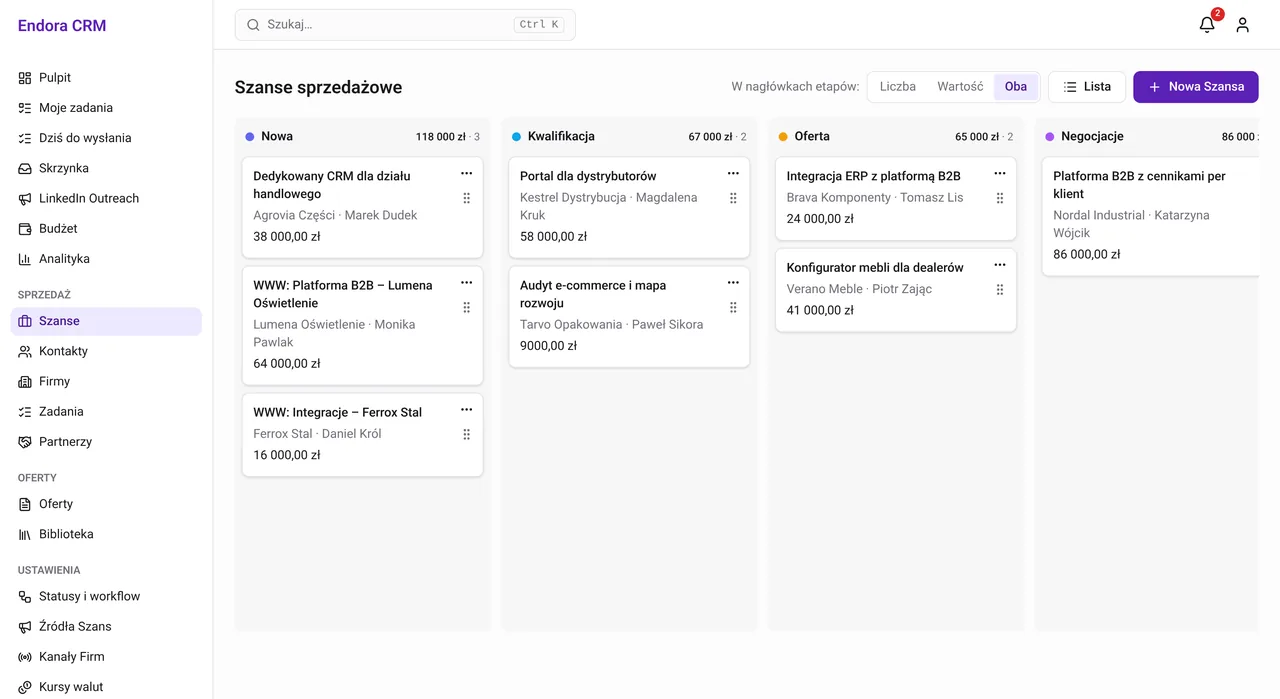
Opportunities: the whole process on one board
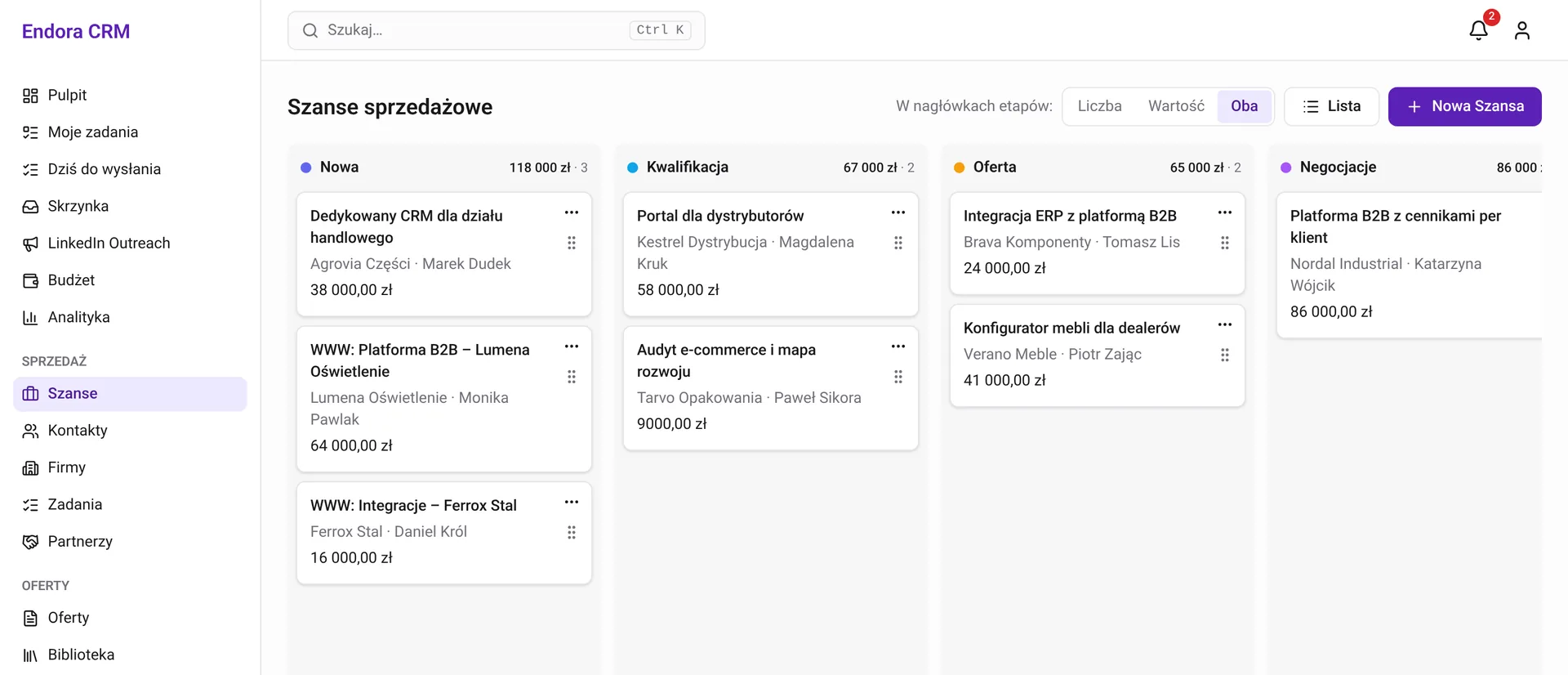
Opportunities move through stages we defined ourselves: from a new enquiry, through qualification and an offer, to negotiation. A stage can have a maximum duration. When an opportunity stays put for too long, its owner gets a notification. An opportunity's value comes from its lead offer, so the column headers show how much money sits in each stage.
LinkedIn: from invitation to opportunity
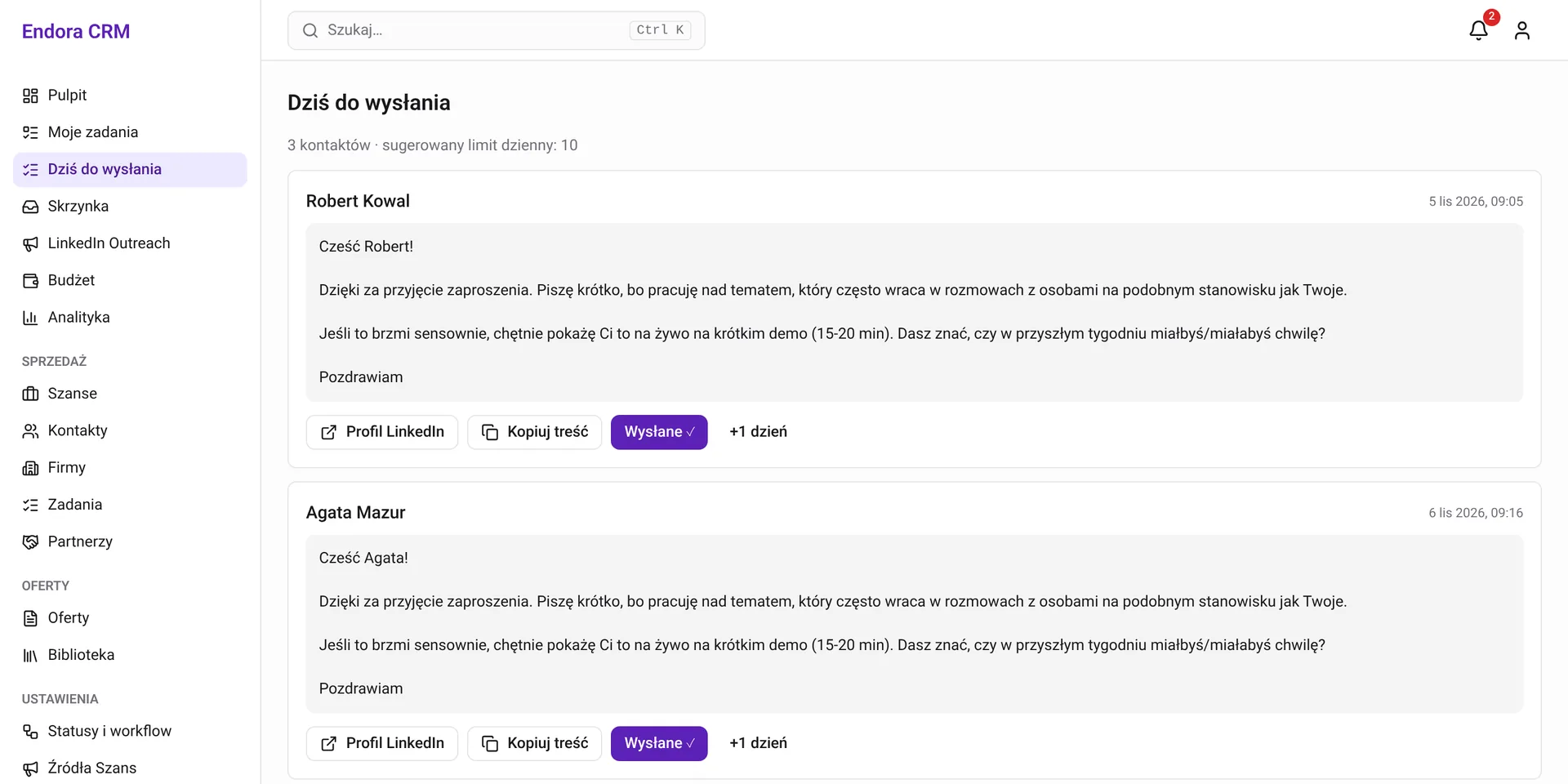
An extension for Chrome, Edge and Firefox connects LinkedIn with the CRM. On a prospect's profile, the salesperson saves them to the CRM and picks a follow-up sequence. The extension recognises people who are already in the database and reports accepted invitations. Every day the CRM builds a “To send today” queue with messages from templates. The salesperson pastes them, sends them and marks them as sent. We deliberately left sending to a human: the extension never clicks “Send” on their behalf. When the conversation turns concrete, one button creates an opportunity.
Gmail: opportunities and tasks straight from an email
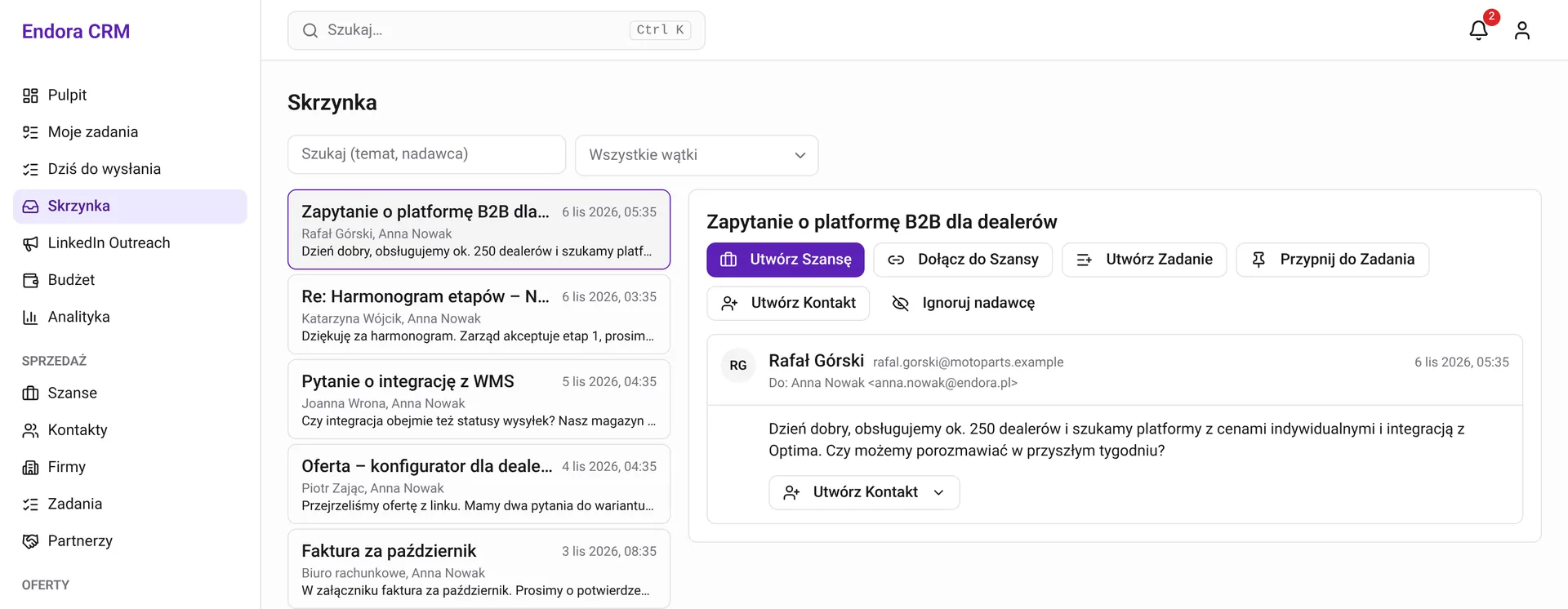
Each salesperson's Gmail syncs with the CRM every minute, and the first connection pulls in 90 days of history. Threads stay private until the salesperson links them to an opportunity or a task. Then the whole team can see them. One click on a message creates an opportunity, attaches the thread to an existing one, creates a task or adds the sender to contacts. Replies sent from the CRM go out from the salesperson's Gmail into the same thread, and a new message from the client in a linked thread notifies the owner straight away.
endora.pl forms: an integration through the API
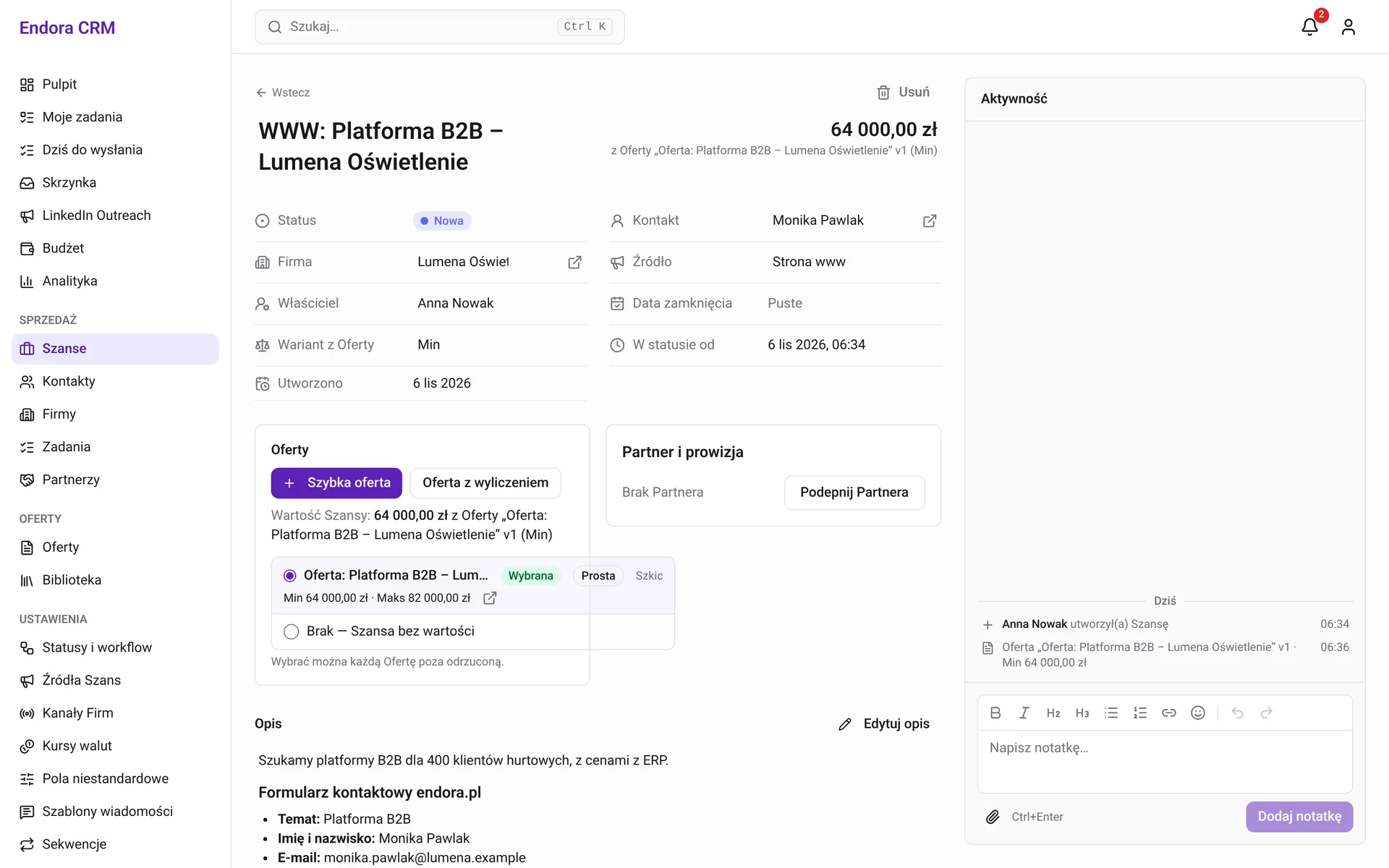
This shows how the CRM connects with other systems. Every contact form on endora.pl sends the enquiry to the CRM API, authenticated with a token that has limited permissions. In response the CRM:
- creates an opportunity "WWW: topic – company" with the source "Website",
- matches the contact by email address or creates a new one,
- matches the company by name or creates it as unverified,
- stores the form contents, landing page, referrer and UTM parameters,
- notifies the owner in the CRM, and by push or email depending on their settings.
Nobody retypes enquiries, and the source reports immediately show which campaigns and pages bring them in. The same token mechanism serves the LinkedIn extension and can serve other systems: an online store, a B2B platform, an ERP or a marketing tool.
The salesperson's dashboard
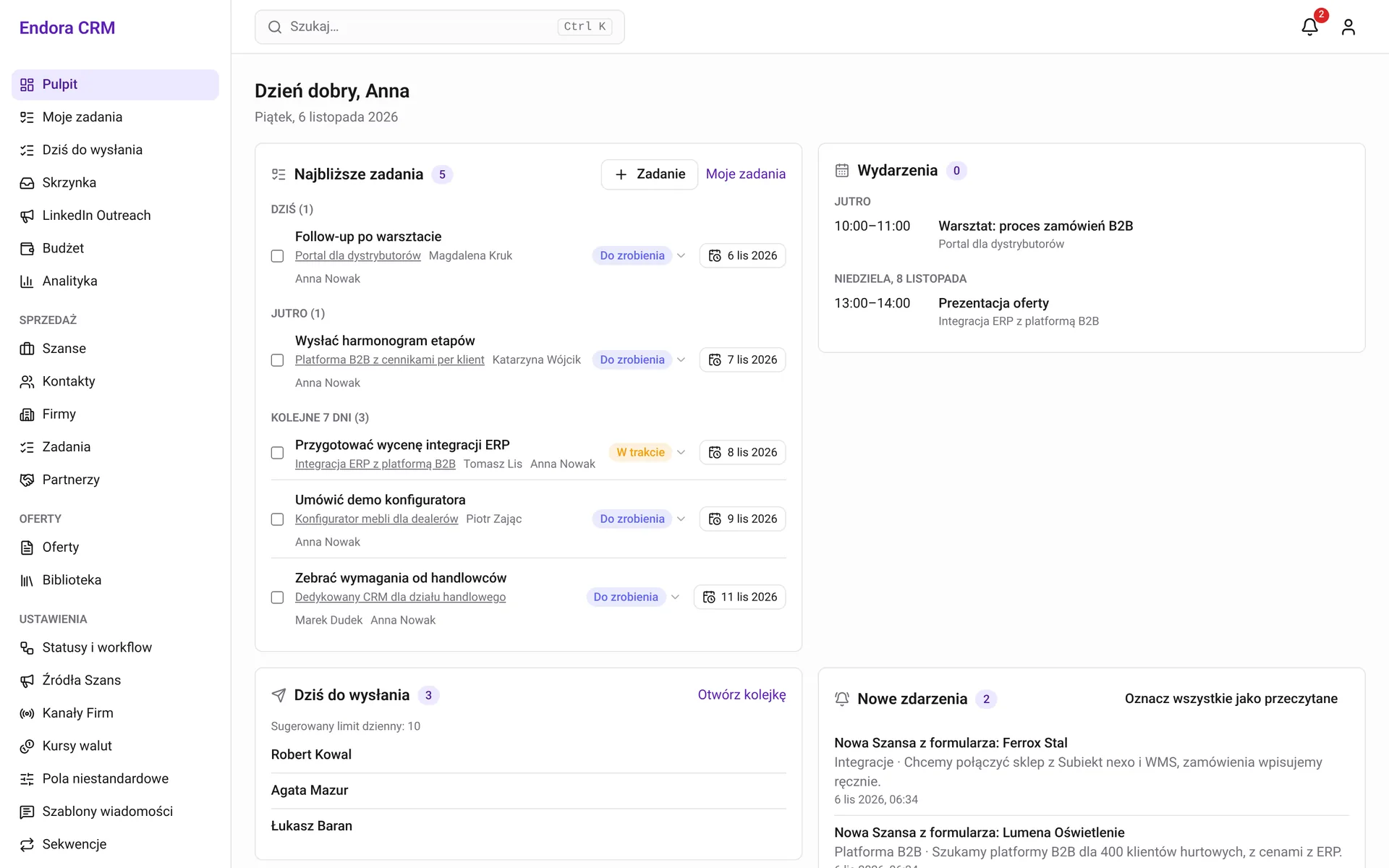
The day starts on the dashboard: tasks for today and the coming days, meetings from Google Calendar, the LinkedIn message queue and new events, such as an opportunity from the form or a client opening an offer. Tasks and events sync both ways with Google, so salespeople can work wherever they prefer.
A PWA: the CRM on the road
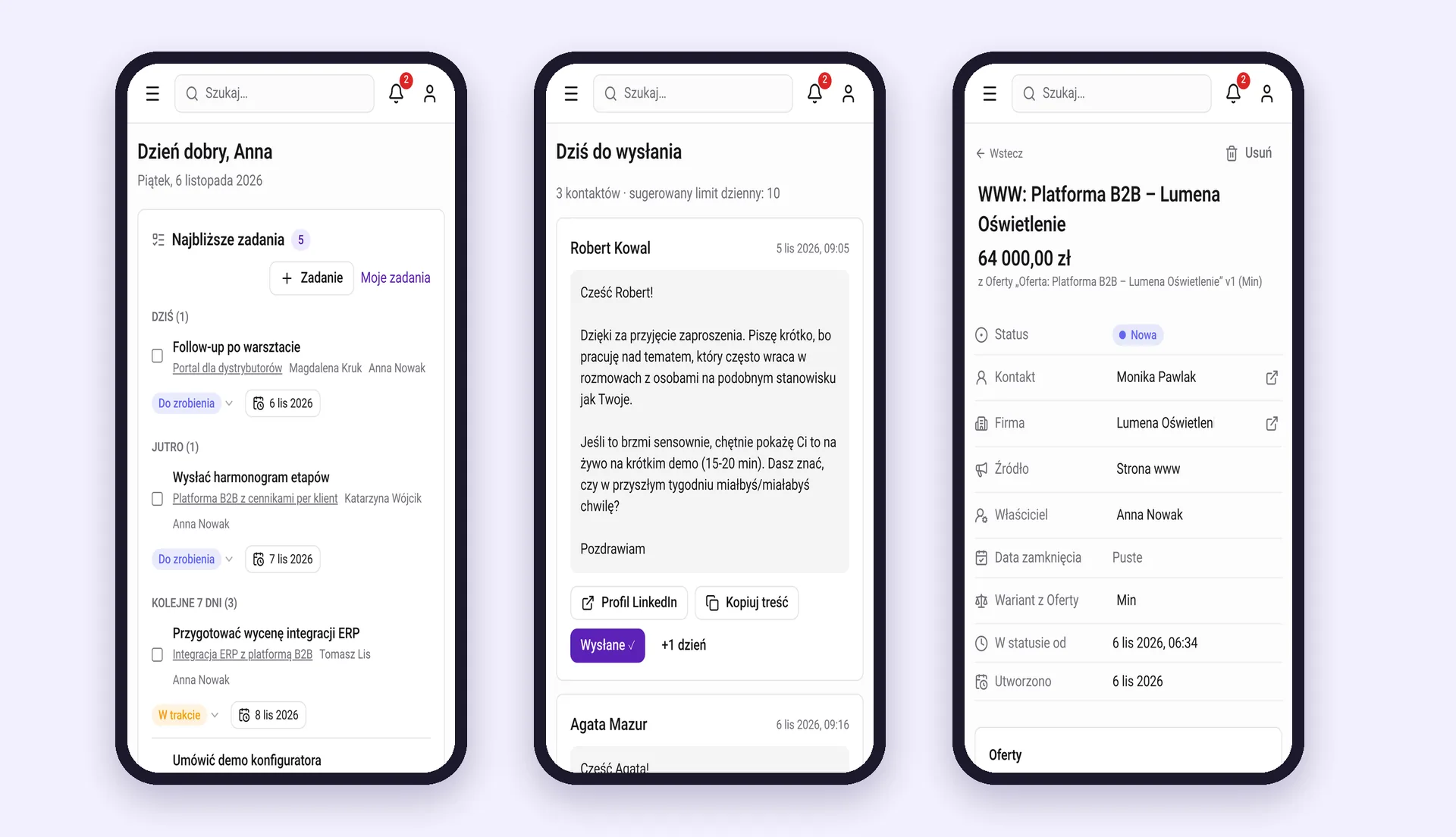
The CRM works as a PWA. Salespeople install it on their phone from the browser, with no app store, and get an icon on the home screen and push notifications. Before a client meeting they check the conversation history and the offer, after it they add a note and a task, and between meetings they tick off follow-ups from the queue. Every view fits a small screen, and each user chooses which notifications they get and through which channel.
Analytics: which sources really sell
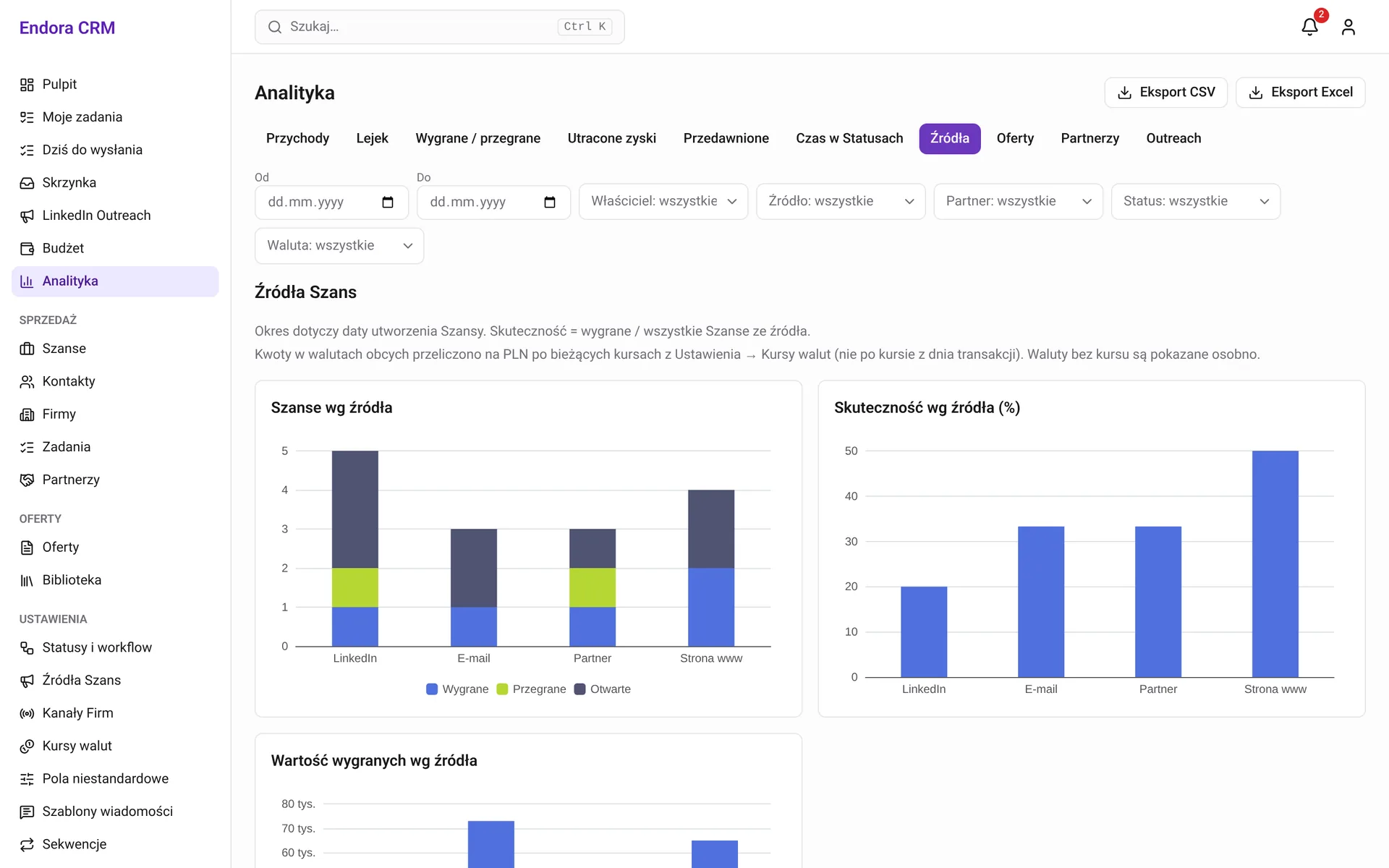
11 reports answer questions that used to need a spreadsheet: how much revenue each channel brought in, where opportunities drop out of the funnel, how much we lose on rejected offers and which opportunities are stuck. Reports filter by date, owner, source, partner and status, and export to CSV or Excel.
What our own CRM taught us
Building a CRM for ourselves let us test first-hand what we tell our clients. The biggest gain doesn't come from the number of features, but from no longer retyping data between systems. Integrations are worth designing from the start, because an API added at the end usually stops at exports. Automation pays off where the decision is obvious, as with an enquiry from the form. Where a salesperson's judgement matters, one click works better than a rule that turns every newsletter into an opportunity.
If your sales process has its own stages, channels and documents, and an off-the-shelf CRM forces your team into workarounds, let's talk about a custom CRM.
Diagnosis
Client data in five places at once
LinkedIn on its own
We ran invitations and follow-ups in a separate extension. When a conversation turned concrete, the contact had to be copied elsewhere.
Email in private inboxes
Agreements with a client sat in one salesperson's Gmail. The rest of the team couldn't see what had been promised, or when.
Website enquiries by email
The endora.pl form sent an email. Someone had to read it and create the contact and company, and the traffic source got lost along the way.
Dates in the calendar, not with the client
Meetings and tasks were in Google but not linked to an opportunity. It was hard to check whether every client had a next step planned.
No numbers on sources
We couldn't quickly say how much business came from LinkedIn versus the website or referrals, so it was hard to decide where to spend our time.
Solution
One CRM built around a B2B agency's sales process
LinkedIn extension
On a LinkedIn profile, the salesperson saves the person to the CRM with one button and assigns a sequence. The extension suggests message templates and a “To send today” queue, but never sends anything by itself.
Gmail inside the CRM
Mail syncs every minute. One click turns a thread into an opportunity, a task or a contact, and a reply sent from the CRM lands in the same Gmail thread.
Opportunities, offers and client decisions
Configurable sales stages, offers with Min and Max variants, and an offer link that shows when the client opened it and whether they accepted it.
Google Calendar and Tasks
Meetings and tasks sync both ways with Google Calendar and Google Tasks, and opportunities that sit in a stage longer than planned trigger a notification.
Sales analytics
11 reports: revenue, funnel, sources, won and lost, lost value, time in status and outreach. Each one exports to CSV and Excel.
API and PWA
API tokens for integrations such as the endora.pl forms and the LinkedIn extension. The CRM installs on a phone like an app and sends push notifications.
How we worked
The same process we offer our clients
- 01
Sales process map
We started by mapping the client's journey: where they come from, who contacts them and when, where the decision is made. The module list came out of that map.
- 02
Specification before code
Every module had a specification, a plan and a task list before any code was written (Spec-Driven Development). That kept the scope clear and changes easy to review.
- 03
Modules with clear boundaries
The CRM consists of 24 modules. Each owns its data and talks to the others through events and services, so new features don't break old ones.
- 04
Tests as a constant
More than 260 automated test files, and the API contract is checked in CI. Integrations such as the website forms keep working after changes in the CRM.
Results
Less retyping, more conversations with clients
- ✓ The full client history in one place: the LinkedIn profile, Gmail correspondence, notes, tasks and offers on one opportunity
- ✓ Enquiries from endora.pl reach the CRM on their own, with the topic, message, landing page and UTM parameters, and the owner gets notified
- ✓ An opportunity or task from an email in seconds, without copying data between systems
- ✓ Salespeople work on the road from their phone: today's tasks, the follow-up queue and opportunity details in a PWA with push notifications
- ✓ We know which sources sell: reports show revenue and win rate separately for LinkedIn, email, the website and partners
- ✓ The CRM is open to further integrations: any system with an API token can create opportunities and contacts
See next
More case studies

Custom CRM
Custom CRM for an Automotive Sales and Leasing Service
From spreadsheets and phone calls to a purpose-built CRM for the leasing sales process - 6 modules, e-signature integration, and full sales analytics.
New sales platform
Endora Commerce: 12 years of B2B rollouts in one platform
How the Endora core team turned 120+ B2B rollouts into Endora Commerce: open source under the MIT licence, 60+ modules and a live demo you can test.
Have a specific challenge?
Don't just read about it - let's talk about your case.