
Biotop: a CRM with a task system and a roof pricing calculator
For a roof renovation company working across Poland: a task system for crews, a CRM, an online pricing calculator and a mobile app API. An MVP in 3 months, then development and maintenance.
- 2 years
- of cooperation: from building the MVP through development and maintenance
- 82
- API endpoints for the panel, the mobile app and the calculator
- 97
- merge requests merged in the backend
- 4
- Endora people on the project
- Client
- Biotop
- Industry
- Roof renovation: washing, painting and impregnating tile and metal roofs across Poland
- Scope
- User story analysis, data model design, task system and CRM, admin panel, mobile app API, online pricing calculator, CI/CD and deployments
- Cooperation period
- December 2018 - November 2020
- Technologies used
- PHPLaravelMySQLVue.jsTypeScriptGoogle MapsDockerGitLab CI/CDAnsible
Biotop is a company from Lesser Poland that washes, paints and impregnates tile and metal roofs all over Poland. It works with two-person crews, a team leader and a helper, who travel to clients in different provinces. At this scale the whole business rests on two things: a fast quote for the client and a smooth handover of the order to the crew in the field.
From December 2018 to November 2020 we built, developed and maintained for Biotop a task system with a CRM, a panel for the office, an API layer for the crews’ mobile app and an online pricing calculator. The first version of the system (MVP) was ready in 3 months, and the following months went into new features and maintenance. The mobile app was built by another vendor, and we delivered its entire backend: login, orders, comments, photos, location and reports. The repositories’ history holds 803 commits by four Endora people.
Task system: an order pool for crews
The starting point was a list of 37 user stories written from the point of view of a worker and an administrator. A worker wants to see orders to pick up, assign one to themselves, add photos, a video or a note and mark the work as done. An administrator wants to create crews, assign roles, decide who sees which order and move orders between crews.
In the system it works like this: an order goes to the pool or straight to a specific crew, each crew has its own queue with priorities, and the status changes according to the role’s permissions. The storekeeper has a separate, shortened view of current orders with the paint colour and attachments, to prepare materials. Every change to an order is saved in its history, so it is clear who corrected the address or the colour, and when.
For the business this means the office does not have to hand out work by phone, and the owner sees in the statistics how many orders are open and closed, per crew and per person.
CRM and map: the order card and the nearest crew
The order card links the client with the roof. A contact has a first name, last name and multiple communication channels, and the order stores the covering parameters: roof type, material, sheet or tile shape, trapezoid height, corrugation, peeling paint, degree of corrosion, area, gutters and colour. On top of that come the net price, tax rate, deadlines and discount.
The CRM includes a map on which the office sees both the crews working in the field and the orders. The mobile app sends workers’ current position, and orders can be filtered by status, crew, person, location, contact channel or keyword.
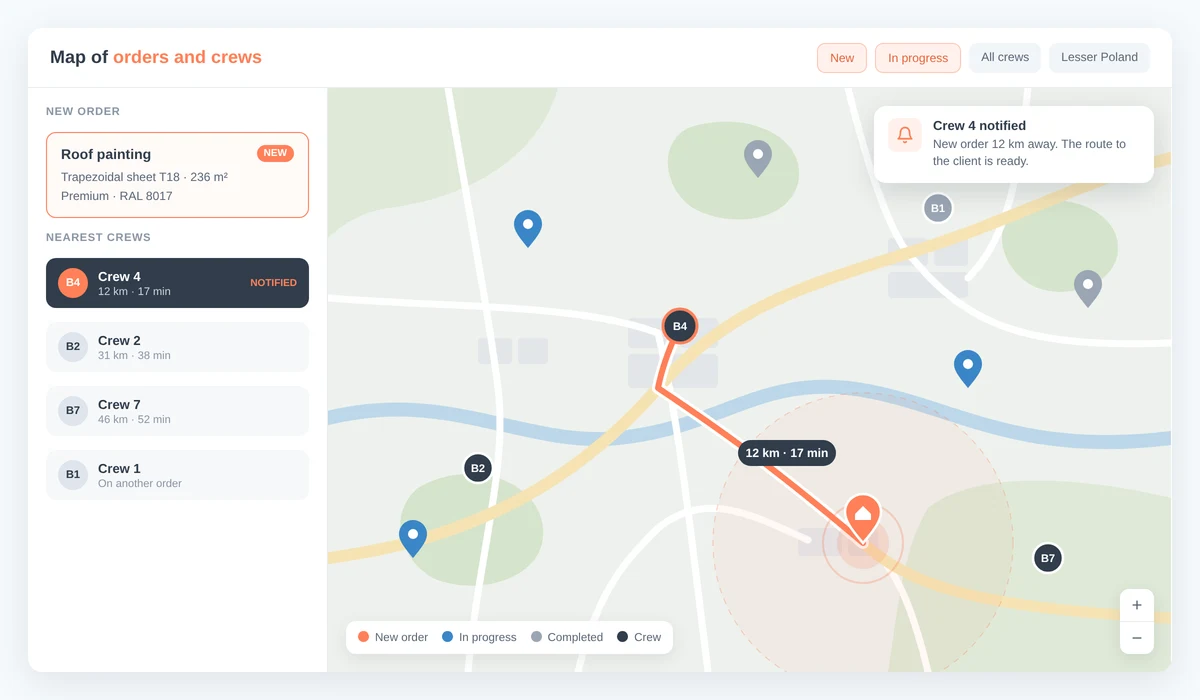
The illustration shows how the map works. Crew names, distances and order details are examples.
Based on this, the CRM finds the crew currently nearest to an order, plans its route to the client and notifies it about the new order. For the business this means shorter journeys, a faster response to an order and work assigned according to where the crews actually are, not what the office remembers.
Pricing calculator: a roof price without a sales visit
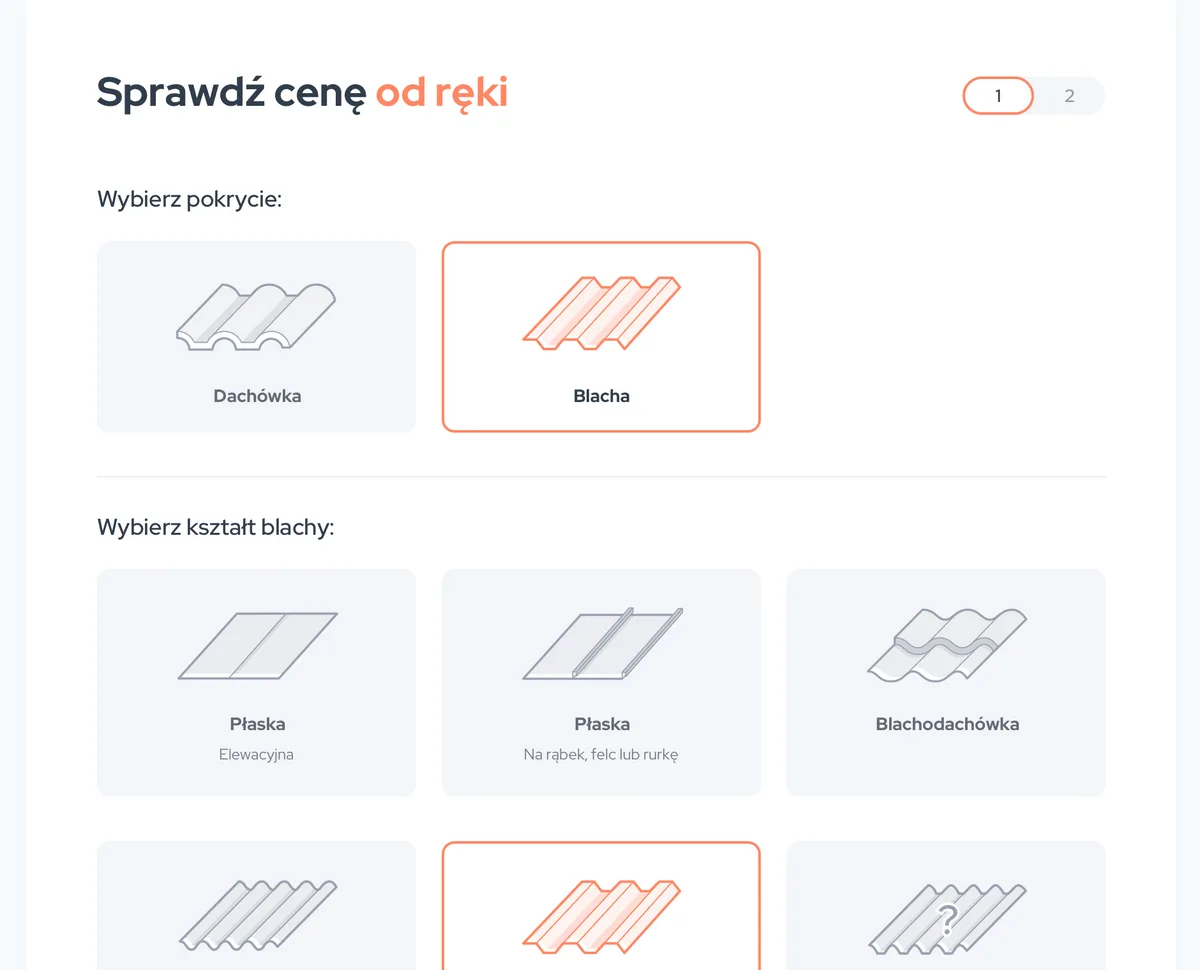
The price per square metre depends on many factors at once. A trapezoidal sheet takes more paint than a flat one, so the system adds a corrugation factor to the area, from 7% for a fine trapezoid to 50% for a high one. Peeling paint and corrosion raise the price, small roofs carry a per-metre surcharge, and each province has a travel surcharge. A client with an unusual sheet can enter the measured factor themselves.
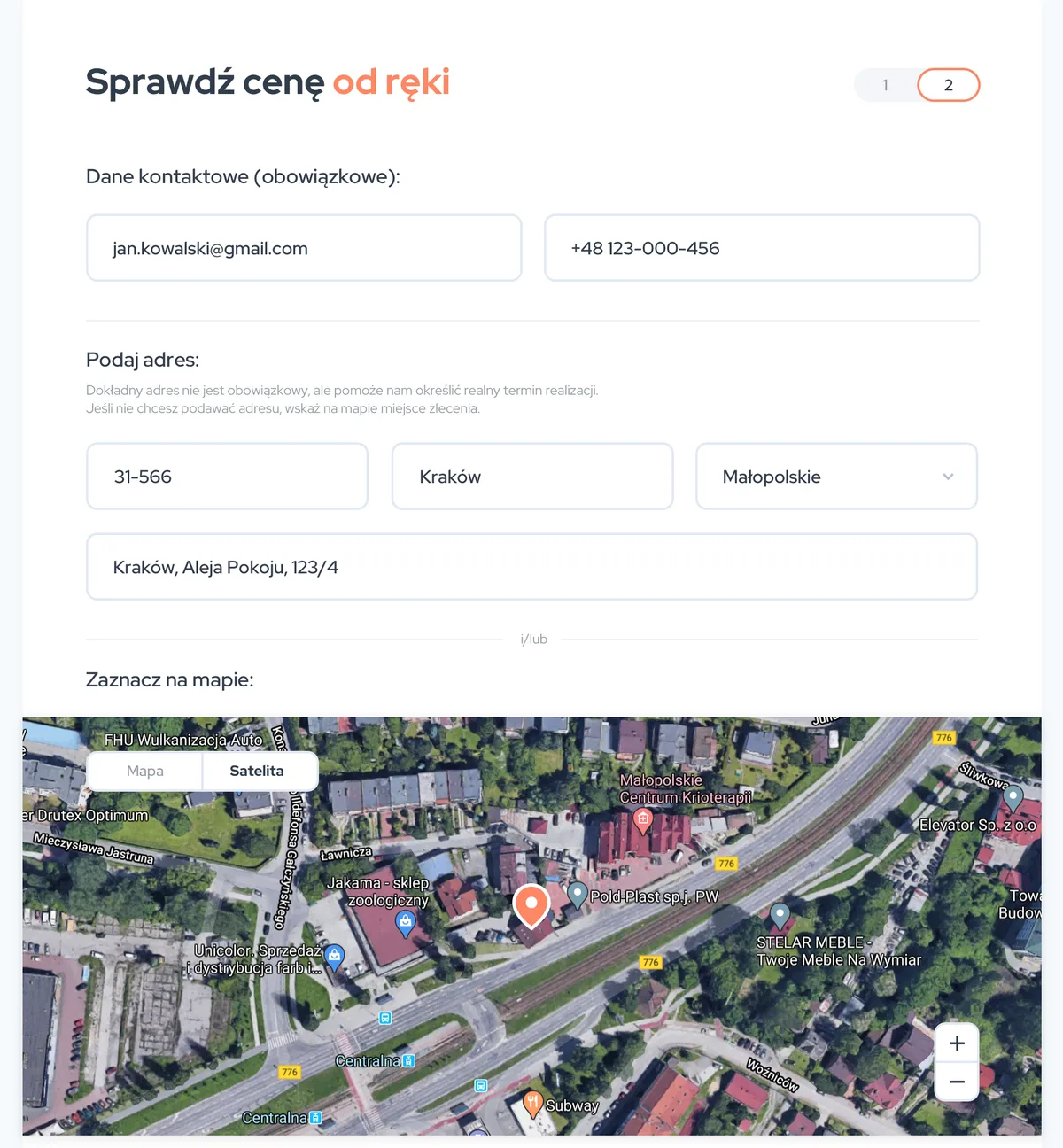
In the second step the client gives a phone number and e-mail, and can either type in the address or just mark the roof on a satellite map if they prefer not to share full details. They can also add photos of the roof. Progress is saved under a token, so the calculator does not lose data along the way.
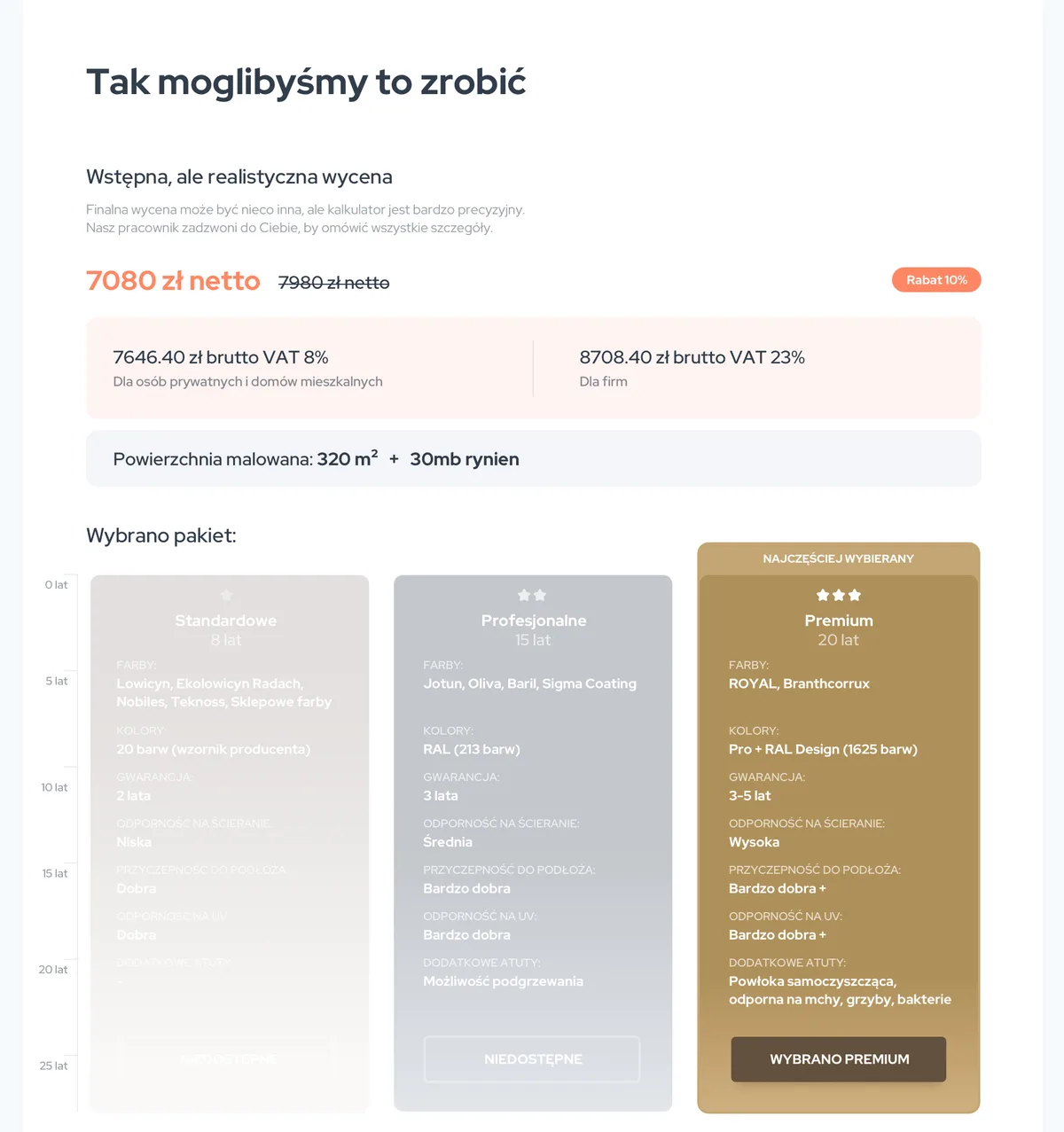
The result shows the net and gross price for private clients (8% VAT) and companies (23% VAT), plus three paint packages that differ in durability, warranty and colour range. RAL colour selection includes surcharges for specific colours and the option to match the colour to a sample sent in by the client.
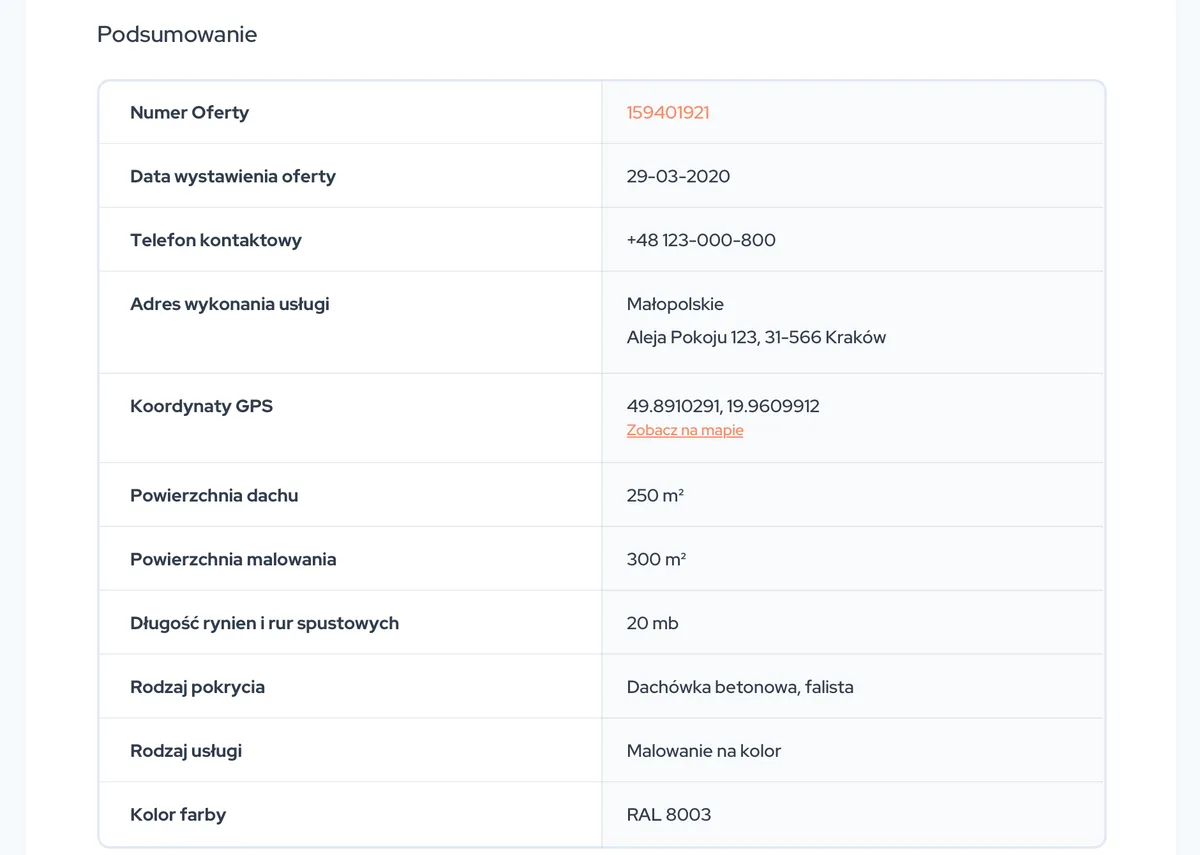
When the client clicks “Zamawiam” (“Order”), the order goes into the task system as a task with all roof parameters, the contact, the colour and the photos. The office changes base prices and province surcharges in an editor, without a developer. For the business this means the client gets a realistic quote on the spot, and the resulting order is immediately ready to be assigned to a crew.
Completion report: settling work in the field
When the job is done, the crew fills in a completion report: start and end dates, before and after photos, a note, the client’s signature and payments with method, tax rate, amount and due date. The report has a flag showing whether the work has already been settled with the crew. For the business this means proof of service for every roof and a clear basis for paying the crew.
Technology in the background
The backend was built on Laravel as a set of modules (Core, Tasks, Settings) with a MySQL database and OAuth2 authorisation, separately for users and for the public calculator. We generated the API documentation from the code, together with a Postman collection, so the mobile app team always worked from an up-to-date description. The panel and the calculator are Vue.js applications, and deployments to the test and production servers ran through GitLab CI/CD and Ansible. Need a system that connects the office with crews in the field? See how we build custom CRM systems, or let’s talk about your project.
Business challenge
What needed solving?
Orders in many channels
Enquiries came in by phone and through the website. The office had to collect and check them, pass them to the right crew and then keep track of what was happening with every roof.
Crews in the field
Two-person crews work in different provinces. They needed a list of orders to pick up on their phones, roof details, the client’s contact and a place for notes, photos and settlement.
Pricing required a visit
A roof’s price depends on the covering, the shape of the sheet or tile, the coating’s condition, the paint, the colour and the travel distance. Without an online tool, every quote meant a call with a salesperson or a site visit.
Settlement and control
The owner wanted to see who changed an order and when, how many orders were open and closed, and how a crew had settled the work it did.
Solution
One system from quote to crew settlement
Task system for crews
A pool of orders to pick up, assignment to a crew or a person, priorities in each crew’s queue, colour-coded statuses and order visibility that depends on the role.
CRM and the order card
Contacts with multiple communication channels, roof parameters, net price and tax, deadlines, comments, notes with attachments and a full change history.
Map of crews and orders
Crews in the field and orders on one map. The system finds the crew nearest to an order, plans its route to the client and notifies it about the order.
Completion report
Work dates, before and after photos, a note, the client’s signature and payments, with a flag showing whether the work has been settled with the crew.
Online pricing calculator
The client picks the covering, shape, roof condition, area, paint and colour, gets a quote in three packages at the end and can place an order right away.
API for the mobile app
82 documented endpoints with OAuth2 authorisation, used by the panel, the calculator and the crews’ mobile app built by another vendor.
How we worked
From user stories to settlements in the field
- 01
User stories and data model (December 2018 - January 2019)
We started from 37 user stories with an hourly estimate. They became a modular Laravel backend: users, roles, crews, tasks, statuses and settings, with OAuth2 login and generated API documentation.
- 02
Task system and panel (February - May 2019)
Comments, notes and attachments, contacts, filters, statistics and an order map. In parallel we built the admin panel in Vue.js, where the office manages crews, roles, statuses and orders.
- 03
Mobile app API and CI/CD (November 2019 - January 2020)
We extended the API with what the crews’ app needed: task history, avatars, roof parameters on the order. Deployments to the test and production servers moved to GitLab CI/CD with Ansible.
- 04
Pricing calculator (February - August 2020)
Based on Biotop’s specification we moved the price list into the database and built the pricing logic, RAL colour selection, saving the client’s progress and an order that creates a task in the system.
- 05
Work in the field (March - November 2020)
A storekeeper view, cancellations with a reason, filtering by location and contact channel and, finally, a completion report with photos, the client’s signature and payments.
Results
What did Biotop gain?
- ✓ One place for orders from the phone, the website and the calculator, with a history of every change
- ✓ An order goes to the nearest crew, with the route to the client ready
- ✓ Crews pick orders from the pool and work on the same data as the office, through a mobile app built on our API
- ✓ An online preliminary roof quote without a sales visit, with the order going straight into the system
- ✓ Base prices and province surcharges changed in an editor, without code changes
- ✓ A completion report with before and after photos, the client’s signature and payments for settling the crew

Have a specific challenge?
Don't just read about it - let's talk about your case.